
Reef tank app: A logbook for your reef tank
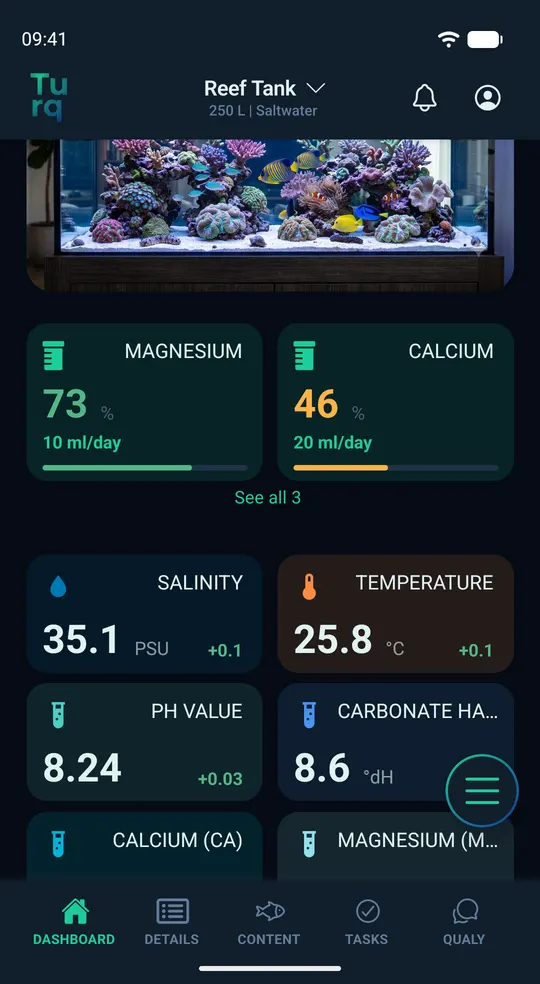
Log KH, calcium, magnesium and salinity, bring in ICP results, keep an eye on your dosing bottles and see how stable your tank is. One tank is free and ad-free, and you can run it without any AI if you like. Turq works for freshwater and brackish tanks too.
Import ICP and lab reports
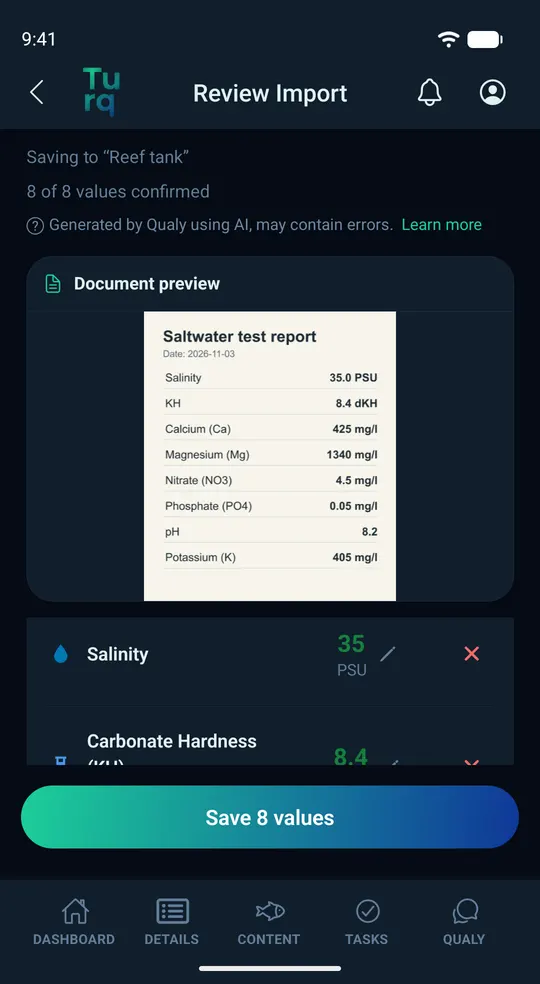
Had your water tested by a lab? You don't have to type in the results. Under Details › Import, take a photo of the report, pick a screenshot from your gallery or choose the lab's PDF. Qualy reads the values with AI and can be wrong. That's why “Review Import” shows you every value, so you can edit or remove it before you save.
- Turq marks anything worth a closer look: an uncertain label, a missing unit or an unusual value.
- Nothing is saved until you've confirmed it. After that, the values sit in your history just like the ones you log yourself.
- Each report counts as one lab report import, even if you discard it afterward: 1 a month with Free, 5 with Pro.
- You need AI features turned on for this. While they're off, nothing goes to AI providers.
- The import doesn't explain what the results mean, and it doesn't turn them into dosing amounts.
Reef parameters in one place
Alkalinity (KH), calcium, magnesium, nitrate, phosphate and salinity: the parameters you test most often in a reef tank are ready to log, and so are the trace elements from an ICP test.
- Over 70 parameters, from KH, calcium and magnesium to trace elements such as iodine, strontium, boron and molybdenum.
- Salinity in PSU or as specific gravity (S.G.), KH in dKH (shown as °dH in the app), ppm or meq/l, nutrients and trace elements in mg/l and µg/l or in ppm and ppb. You choose the units in the settings.
- You set the target ranges for each tank yourself. For saltwater they come prefilled as a starting point, and you can change any of them.
- Every reading goes into your history. Journal entries, like a water change or switching to a new salt mix, show up as markers in the chart.
Dosing with bottle levels
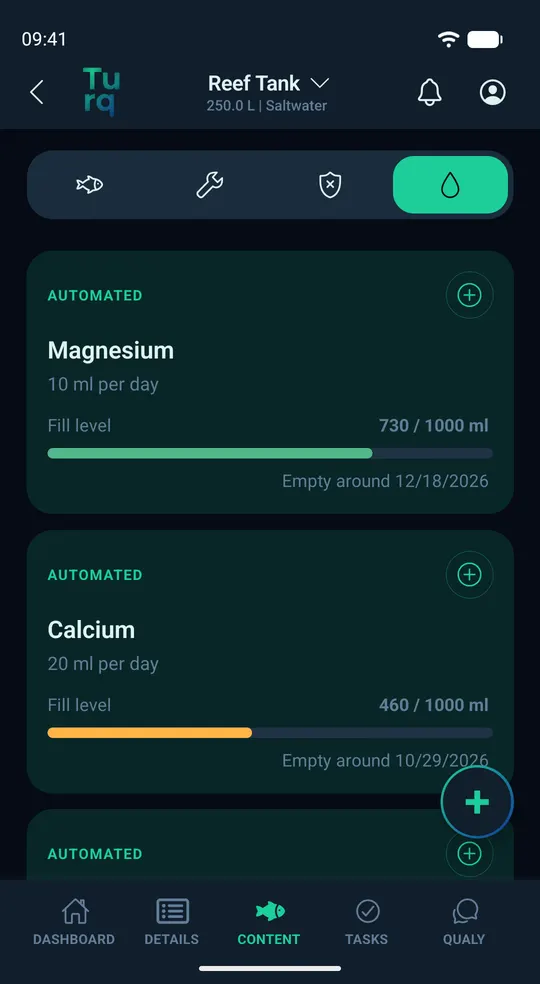
Add each dosing product with its bottle size, whether a pump doses it or you do it by hand. Turq keeps track of what's used and shows the fill level of every bottle.
- Automated: a pump doses the same amount every day. Turq deducts it daily and shows when the bottle is expected to run out.
- Reminder: Turq reminds you to dose at the interval you choose. When you check off the task, the amount is deducted.
- Manual: you log each dose yourself. When you refill a bottle, you log that too.
- If a pump runs through Home Assistant or a similar system, that system can log each dose through the Turq API.
- Free includes 3 dosing products per tank, Pro as many as you need.
Stability over time
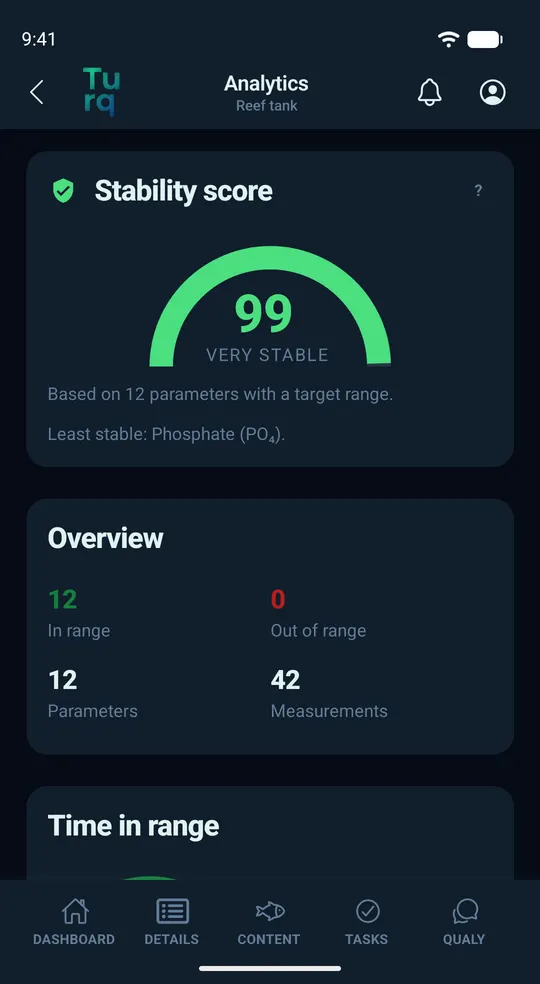
In a reef tank, stable parameters matter. Analytics shows how stable your tank has been, measured against your own target ranges.
- Free: your stability score, based on the parameters you've set a target range for.
- Pro: time in range for each parameter, plus average, minimum, maximum and fluctuation.
More for your reef
- Livestock: fish, corals, invertebrates and algae with species search, plus diseases and pests with dates and notes.
- Equipment like your skimmer, return pump, wavemakers, lights and heater.
- Tasks with reminders, one-time or recurring, like a water change, cleaning the skimmer or testing your water. If you share the tank, every completed task shows who checked it off.
- Tank Cam: turn an old Android phone into a reef tank camera that sends a photo every hour, with Pro as often as every 10 minutes.
- Smart home: Home Assistant and similar systems can log readings, doses and completed tasks through the Turq API. No subscription needed, just a free, secured account.
Reef tank app FAQ
Is Turq available for iPhone?
Not yet. Turq is Android only for now. An iPhone version is planned, but there's no date yet.
Does Turq tell me what my ICP results mean?
No. Turq imports the values and shows them over time, next to your target ranges. What a value means for your tank is for you to judge, perhaps with help from your lab or your local fish store. With AI features turned on, you can ask Qualy about your readings. Qualy answers with AI and can be wrong.
Can I log salinity as specific gravity?
Yes. Under Settings › Units › Salinity, pick PSU or S.G. Turq converts between the two, using 25 °C as the reference for specific gravity, and the input field says so too.
Can I track my Balling dosing?
Yes. Add one dosing product per solution, with bottle size and a daily dose or a reminder. Free includes 3 dosing products per tank, enough for classic Balling; with Pro you can add as many as you need. How much you dose is up to you, following the manufacturer's instructions.
Does Turq run my equipment, like a dosing pump?
No. Turq is a logbook. It doesn't measure anything itself and doesn't switch any devices. Your own systems, such as Home Assistant, can log readings and doses through the Turq API. The API docs explain how.
Try Turq with your reef tank
Turq is currently in a closed test on Google Play, Android only and 18+. To look around first, you can start with a saltwater demo tank. One tank of your own is free and ad-free.